Kawaii Aesthetic Wallpaper
- 4.8
- Rating
- 10.00M
- Installs
- Free
- Price
 Analysis by App-foxy
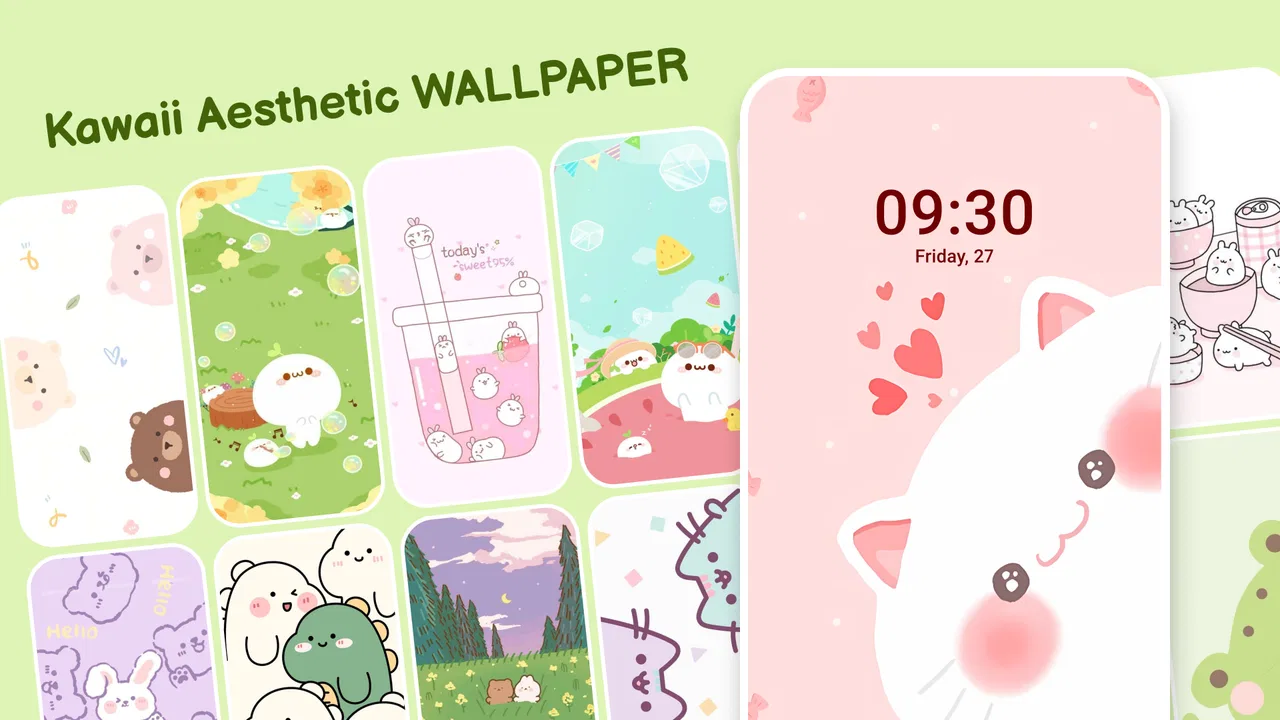
I usually judge a wallpaper app by one simple question: can I open it, find something that suits my phone, and make the change without turning the process into a project? Kawaii Aesthetic Wallpaper is built around that quick personal touch. It is a free personalization app from Galaxy studio apps, focused on soft, playful, cute-looking backgrounds rather than trying to become a complete launcher or theme manager. After using it, I see it as a friendly option for anyone who wants their screen to feel more cheerful with very little effort.
The app is aimed at people who enjoy pastel colors, cute illustrations, charming patterns, and the broader kawaii aesthetic. That focus is important because it makes the experience more recognizable than a general wallpaper catalog. You are not opening it to browse every possible style; you are opening it because you already want a particular mood. The store summary describes it as a source of awesome kawaii aesthetic wallpapers, and that is a fair description of its purpose, although the real value is in how quickly that style can be turned into a usable everyday background.
It belongs to the personalization category, carries an Everyone age rating, and supports devices running Android 5.0 or later. The current version is 3.1.2. Those details make it accessible to a wide range of Android users, including people with older phones who may not want a demanding visual customization tool. I would still treat the app as a focused wallpaper browser, not as a replacement for a full customization suite.
You May Also Like

 Pandora - Music & Podcasts
Pandora’s Music Is Easy to Start, but Harder to Recover
Pandora’s strength is its low-effort path from a seed to a station. Its weak spot is how much confidence it asks you to place in connection, setup, and quiet recovery.

 8 Ball Pool
 Is Built on Rivalries, Rematches, and Routine
A close look at the rivalries, rematches, shared routines, and unanswered safety questions that turn a quick pool match into a persistent mobile community.

 Samsung Music
’s Quiet Strength Is Playing What You Already Own
Its reach comes less from spectacle than from dependable access to a personal library. That simplicity is both the app’s strongest retention engine and its ceiling.

 AccuWeather: Weather Radar
AccuWeather Review: A Quick, Clear Forecast for Everyday Decisions
For everyday plans, the best forecast is the one you can understand quickly. AccuWeather makes rain timing, radar, and local conditions easy to act on, with a few trade-offs.

 Hill Climb Racing
Why Hill Climb Racing Still Turns Crashes Into One More Run
A tiny car, a bumpy hill and one more upgrade: Hill Climb Racing keeps resurfacing because its simple chaos makes every near-miss feel personal.

 AliExpress - Shopping App
AliExpress Makes Global Shopping Feel Personal, but Shoppers Bear the Risk
AliExpress turns a global marketplace into a pocket-sized discovery engine. Its reach is useful, its shopping loop compelling, and its trade-offs easy to miss.
More From Our News Desk
View All News


What the first visit feels like
On the first launch, I would recommend resisting the urge to change the wallpaper immediately. Spend a moment looking at the overall visual direction and noticing which images actually work for your own screen. A wallpaper that looks adorable in a preview can become distracting once icons, widgets, and notification text sit on top of it. The strongest choices are usually the ones with a calmer area behind the icons, even when the rest of the image has plenty of character.
This is where the app’s narrow theme works in its favor. Instead of sorting through unrelated landscapes, abstract designs, sports images, and celebrity photography, you can stay within a coherent visual world. If you are decorating a phone for a younger family member, refreshing a tablet, or simply tired of a plain default background, the style is immediately understandable. I found that the app is best used when I make a small decision first: do I want a quiet pastel background, a busier illustrated design, or something that feels more like a pattern?
That question saves time. It also prevents a common mistake with wallpaper collections: choosing an image because it looks attractive by itself, then discovering that it makes the home screen harder to read. I prefer to think of the wallpaper as part of the interface rather than a poster. Cute details are welcome, but they should not compete with the apps I need to find quickly.
The app has attracted a 4.8 average from around 110 thousand ratings, with more than a thousand written reviews, and it has passed 10 million installs. Those figures suggest that the concept has broad appeal, but they do not remove the need to check whether the visual style matches your taste. Popularity is useful reassurance about interest in the app; it is not a guarantee that every design will suit your particular launcher, screen shape, or icon arrangement.
Getting ready without overthinking it
Because this is a free app, the first step is straightforward: install it on a compatible Android device and open the catalog. I would keep the phone’s current wallpaper available while browsing, especially if it is a carefully arranged lock-screen image. That way, you can compare rather than commit too early. If the app presents an image that looks promising, preview it in the context of your phone before deciding whether it deserves a permanent place.
A useful habit is to check both the lock screen and the home screen during the first setup. A detailed kawaii illustration may look wonderful on the lock screen, where there are fewer icons, but feel too crowded behind a full grid of applications. Conversely, a simple pattern may be perfect for the home screen but feel empty on the lock screen. Treating those two destinations differently gives the app more value than applying the first appealing image everywhere.
I also suggest looking at the crop before finishing the change. Phones vary in aspect ratio, and an image that is framed nicely in the app can lose its main character when the system adjusts it for your display. Keep the most important face, character, or decorative element away from the edges when possible. This is a small workflow adjustment, but it is one of the easiest ways to avoid a disappointing result.
The app includes in-app purchases ranging from $0.99 to $99.99 per item. That makes the free starting point attractive, but I would pay attention whenever an optional purchase appears and decide whether it genuinely improves the experience for you. Someone who changes wallpapers occasionally may never need to spend anything. Someone who wants to explore every available option should set a personal budget first, particularly because a wide price range means not every purchase has the same weight.
My recommended first successful action
For a first meaningful result, I would choose one wallpaper with a relatively uncluttered center, apply it to the home screen, and then spend a minute checking icon readability. This is more useful than simply downloading several images. You get to see whether the colors work with your icon pack, whether the crop feels natural, and whether the overall look remains pleasant after the novelty wears off.
Here is the everyday scenario where I think the app makes the most sense. Imagine that your phone feels visually dull after months of using the same background. You open the app during a short break, browse toward a soft design, preview it, and apply it before returning to your normal routine. The change takes little mental effort, yet the device feels more personal each time you pick it up. That is the kind of small, practical success this app is designed to provide.
For a stronger result, I would match the wallpaper to how I use the phone. If I rely heavily on calendar widgets, messages, and work shortcuts, I would choose a quieter image. If the home screen is mostly empty and I want the background to be the main visual element, I could choose a more detailed illustration. This is not about finding the objectively best wallpaper; it is about finding one that supports the way I actually interact with the screen.
Another useful approach is to keep one energetic design for the lock screen and one restrained design for the home screen. The lock screen can carry more personality because it is often viewed briefly, while the home screen benefits from visual breathing room. This two-image workflow makes the app feel more flexible without requiring a full theme overhaul.
Where new users can get confused
The word “aesthetic” can create the expectation that every image will look polished with every phone setup. In practice, the final impression depends on the system’s crop, icon layout, widget colors, and the brightness of the display. If a wallpaper seems too busy, that is not necessarily a problem with the image itself. It may simply be a poor match for the number of icons on your home screen.
Another point of confusion is the difference between a wallpaper collection and a complete personalization system. This app gives your background a kawaii direction, but it should not be approached as though it will automatically redesign every icon, widget, font, or system menu. If your goal is a coordinated interface from top to bottom, a launcher or dedicated theme tool may be a better fit. If your goal is specifically to replace the background with something cute, this focused approach is easier to understand.
It is also worth separating browsing from saving. A design that catches your attention is not automatically the right final choice. I like to pause after finding a favorite and ask three practical questions: can I read my icons over it, does the crop preserve the important details, and will I still enjoy seeing it several times a day? Those questions turn casual scrolling into a more reliable selection process.
Users who prefer dark, minimalist, photographic, or highly professional backgrounds may find the catalog’s central style too narrow. The same is true for anyone who wants advanced controls over color, blur, parallax effects, or custom image composition. I would skip this app if I wanted to build a precise visual system from individual design components. Its appeal is strongest when the desired outcome is a ready-made cute background rather than detailed manual editing.
Making the result work with your phone
Once the first wallpaper is applied, the next step is not necessarily to keep browsing. I would adjust the home screen around it. Move the most frequently used icons into areas with less visual detail, reduce unnecessary widgets, and check whether text labels remain easy to read. A kawaii background can make a phone feel warmer, but too many competing elements can quickly make it look messy.
If the image contains a central character or face, place icons around it rather than over it when your launcher allows that arrangement. This preserves the design and makes the screen feel intentional. If your phone automatically centers or crops the image, use the preview as a warning: a beautiful focal point near the edge may be cut off after application. Choosing a composition with generous empty space is often safer than choosing the most elaborate design.
I would also use the app seasonally or emotionally instead of treating it as a one-time installation. A soft background can make a work phone feel less severe, while a brighter design can give an older device a fresh identity. For a child or teenager, the app can be a simple way to personalize a shared tablet, provided the selected image leaves enough contrast for navigation and does not make important shortcuts difficult to spot.
The free price lowers the risk of trying it, but the purchase range means I would not tap through optional offers automatically. First-time users should enjoy the basic browsing and wallpaper-changing experience before deciding whether any paid item is worthwhile. If the free selection already gives you a background you like, there is no practical reason to spend simply because the app offers additional purchases.
How it compares with the usual alternatives
Compared with a general wallpaper app, this one is more focused and therefore less useful for people who want variety across many unrelated subjects. The benefit is that the browsing experience starts closer to the desired mood. You are less likely to spend time filtering out images that were never relevant to you. The trade-off is obvious: if your taste changes from kawaii illustrations to nature photography or dark geometric designs, you may need another source.
Compared with using a personal photo, the app is quicker and more consistent. A photo from your camera may have stronger emotional meaning, but it often needs cropping, editing, and careful placement to work behind icons. These wallpapers are created for a decorative purpose, so they can provide a more immediately finished look. On the other hand, a personal photo offers uniqueness that a catalog image cannot guarantee.
Compared with a full launcher or theme package, the app is simpler and less disruptive. You can refresh the background without changing how the phone behaves. That is ideal for someone who likes the current launcher and only wants a visual update. A launcher is the better choice when you want icon packs, gesture changes, grid controls, and a complete home-screen redesign in one place.
I would also choose a system wallpaper picker over this app when speed matters more than style. The built-in option is usually familiar and may integrate more directly with the phone’s settings. Kawaii Aesthetic Wallpaper earns its place by offering a clearer visual identity, not by replacing every standard wallpaper feature. It is a style-first choice, and that distinction helps set realistic expectations.
Who should try it, and who should move on
I would recommend it to someone who enjoys pastel or cute visual design, wants a quick home-screen refresh, and does not need complicated editing tools. It is especially suitable for first-time wallpaper app users because the goal is easy to understand: browse a themed collection and use a favorite image to personalize the phone. The Everyone rating also makes the app approachable for a broad audience.
I would be more cautious about recommending it to users who are highly sensitive to visual clutter, need a strictly professional appearance, or want complete control over image dimensions and interface behavior. People with older or unusually proportioned screens should pay extra attention to cropping. The stated minimum operating system is Android 5.0, so compatibility is broad, but a compatible device can still produce a less satisfying layout if the screen and launcher handle backgrounds differently.
My most practical advice is to judge the wallpaper after a normal day, not just during the first exciting minute. Look at it while opening messages, checking the weather, and finding an app quickly. If the design remains readable and pleasant in those ordinary moments, it is a good choice. If it constantly pulls attention away from the icons, select a quieter image rather than blaming the entire collection.
Galaxy studio apps has kept the concept clear: this is a personalization app centered on kawaii-style backgrounds, available free to start, with optional in-app purchases. Its large install base and strong average rating make it an easy app to consider, but my recommendation comes more from the focused experience than from those figures. It does one recognizable job and can do it well when the chosen image matches the way your home screen is arranged.
After trying it, I see Kawaii Aesthetic Wallpaper as a pleasant, low-commitment way to give an Android phone more personality. I would install it when I wanted a cute visual reset without changing launchers, icons, or system settings. I would skip it when I needed broad wallpaper variety or professional customization controls. For the right user, the best path is simple: browse with a purpose, preview for readability, apply one carefully chosen design, and let the wallpaper complement the phone instead of taking it over.
FAQs for Kawaii Aesthetic Wallpaper
01What features does Kawaii Aesthetic Wallpaper offer?
Kawaii Aesthetic Wallpaper provides a vast collection of cute and vibrant wallpapers designed to enhance your device's visual appeal. Users can explore categories like pastel, anime, and nature. The app also allows you to save favorites, set wallpapers directly from the app, and receive daily updates with new designs.
02Is Kawaii Aesthetic Wallpaper free to use?
Yes, Kawaii Aesthetic Wallpaper is free to download and use. However, it may include in-app purchases or ads to access premium content or remove advertisements. Users can enjoy a wide variety of wallpapers without any cost, but opting for premium features can enhance the overall experience.
03How often are new wallpapers added?
The app updates its collection regularly, with new wallpapers added daily. This ensures that users always have fresh content to choose from. If you enjoy changing your wallpaper frequently, Kawaii Aesthetic Wallpaper provides a continuous stream of new and trendy designs to keep your device looking stylish.
04Can I use Kawaii Aesthetic Wallpaper on both Android and iOS devices?
Yes, Kawaii Aesthetic Wallpaper is available for both Android and iOS platforms. The app is designed to be compatible with a wide range of devices, ensuring that you can enjoy its features whether you're using a smartphone or a tablet. Simply download it from the respective app store.
05Does Kawaii Aesthetic Wallpaper require an internet connection?
An internet connection is required to browse and download new wallpapers. However, once a wallpaper is downloaded, you can set it as your background and access it offline. This means you can enjoy your favorite wallpapers even when you are not connected to the internet.
Pros
- High-quality
- vibrant images.
- Easy-to-navigate interface.
- Regular updates with new content.
- No intrusive ads while browsing.
- Customizable wallpaper settings.
Cons
- Limited free content options.
- Requires internet for full features.
- Occasional crashes on older devices.
- Some images are low resolution.
- No offline access to favorites.

Kawaii Aesthetic Wallpaper
Gallery